Padre Terminal review (2026): pump.fun’s terminal
We may earn a referral fee if you sign up through our links. It never changes our scores. How we make money
Tested by Locke
Updated Nov 16, 2026 · 10 min read
13 sources checkedRead our editorial policy

Our verdictTerminal (formerly Padre)
Score3.6/5
Is it safe? Mostly, with caveats. The docs describe a non-custodial Turnkey wallet with password-encrypted keys you can export, and we found no hack, but the base fee is not published and the public docs now redirect to the app.
Referral code · 35% SOL cashback on trading fees
memecoin-guruVerified Nov 11, 2026
Best for: Multi-chain memecoin traders who want pump.fun’s own pro terminal for Solana, Ethereum, Base and BNB Chain, on the web and on a phone
Key takeaways
- Padre Terminal is now called Terminal: pump.fun bought Padre on 24 October 2025 and renamed it in November 2025. The app still runs at trade.padre.gg.
- Terminal is pump.fun’s pro trading terminal for memecoins on 4 chains: Solana, Ethereum, Base and BNB Chain, on the web and as a mobile PWA.
- Terminal’s docs give 35% SOL cashback on fees if you sign up with a referral link, such as our code memecoin-guru; the 2025 docs gave 10% by default. The base fee is not published.
- pump.fun’s Fees page charges its 0.45% Platform Fee (0.40% with a code) in the web app and mobile app only, not on Terminal.
- Wallets are non-custodial on Turnkey, with keys encrypted by your own password; the docs say to export your keys before you deposit.
On this page
Key facts
| Type | Web trading terminal |
|---|---|
| Chains | Solana, Ethereum, Base, BNB Chain |
| Trading fee | Check in app |
| Reader perk | 35% SOL cashback on trading fees |
| Referral code | memecoin-guru |
| Last tested | October 2026 |
Score breakdown
How we score- Fees
- 3.0
- Safety
- 3.5
- Execution
- 3.5
- Ease of use
- 4.0
- Features
- 4.5
What we like
- Four chains in one app: Solana, Ethereum, Base and BNB Chain
- Non-custodial Turnkey wallet, keys encrypted with your own password, key export recommended
- SOL cashback on fees: 35% when you sign up with any referral link, 10% by default in the 2025 docs
- No pump.fun app Platform Fee (0.45%) on Terminal trades, according to pump.fun’s Fees page
- Limit orders with trailing stop loss, auto exit strategies, Trenches, wallet tracking and a multi-chain portfolio
What we don’t like
- The base trading fee is not published in the docs we could open
- The public docs site now redirects to the app; we used archived copies
- Pump.fun removed all utility from the PADRE token at the acquisition; holders got PUMP compensation
- If you lose your password, Terminal cannot recover it, so you must export your keys first
Our Padre Terminal review in short: Padre is now called Terminal, and pump.fun owns it. It is the “pump fun terminal” for terminal trading of memecoins on Solana, Ethereum, Base and BNB Chain, with a non-custodial wallet and SOL cashback of 10% to 35% on fees. The base fee is not published. We rate it 3.6/5 after hands-on trading.
Padre Terminal in one paragraph
Padre is a web trading terminal for memecoins. On 24 October 2025, Cointelegraph (opens in a new tab) reported that memecoin launchpad pump.fun had acquired Padre, to bring more liquidity to tokens on its platform. On 5 November 2025, Phemex News (opens in a new tab) reported that Padre changed its name to Terminal and stays reachable at padre.gg.
What it is called now: Terminal. On 2026-10-24, the official app (opens in a new tab) has the title “Terminal | Your Edge in Memecoin Trading”, the X account @TradingTerminal (opens in a new tab) uses the name Terminal, and the docs say “Terminal (formerly Padre)”. The domain is still padre.gg, and the padre.gg landing page still shows the old name Padre. People search for it as “padre terminal”, “pump fun terminal” and “terminal memecoin trading”: all three mean this product.
The About Terminal (opens in a new tab) docs page lists Solana, Ethereum, Base and BSC, with market and limit orders on all four chains. The app describes itself as “the fastest and most reliable memecoin trading terminal” on the same four chains.
In February 2026, pump.fun also bought the Vyper terminal and directed its users to Terminal, according to Cointelegraph (opens in a new tab). The pump.fun web menu has a Terminal link that opens trade.padre.gg.
Fees and cashback
Terminal does not publish its base trading fee in the docs we could open. What the docs do publish is the cashback, paid in SOL.
| Item | What the docs say | Source |
|---|---|---|
| Base trading fee | Not published: check in app | No public fee page found |
| pump.fun app Platform Fee (0.45%, or 0.40% with a code) | Not charged on Terminal | pump.fun Fees page (opens in a new tab) |
| Cashback, no referral link | 10% of your trading fees | Rewards page (June 2025) (opens in a new tab) |
| Cashback, signed up with a referral link | 35% of your trading fees | Referral Program (opens in a new tab) |
| Referrer reward | The same page says “up to 40%” and “35%” of referred users’ fees | Referral Program (opens in a new tab) |
| Gas and taxes | Extra, not covered by cashback | Referral Program (opens in a new tab) |
- Claiming: the docs say you claim cashback from the Rewards tab, with an auto-claim panel.
- Our link: it carries our referral code memecoin-guru. If you sign up through it, the Referral Program (opens in a new tab) docs give you 35% cashback on your fees, not the default rate. Use the link before you create your account, because the docs describe no way to add a code later.
- pump.fun coin fees: when you trade a pump.fun coin on Terminal, the coin’s own pool fees still apply, as on every interface. Our pump.fun fees guide has the tiers.
- Network costs: on Solana you also pay a priority fee and often a Jito tip. Compare totals with our fee calculator.
35%
Safety and incidents
- Custody: the Security page (opens in a new tab) says Padre wallets are fully non-custodial and use Turnkey infrastructure for private keys. See .
- Password encryption: the same page says your private keys are encrypted with a password you set, and that the team cannot see that password. Someone who gets into your account still cannot trade without it.
- No password recovery: the FAQ (opens in a new tab) says a forgotten password cannot be recovered. The getting started guide (opens in a new tab) tells you to export your private keys before you deposit any funds.
- Token warnings: the FAQ warns about tokens with , where the developer can block you from selling.
- October 2025, PADRE token: when it announced the deal, Pump.fun said the PADRE token “will no longer have utility on the platform”. PADRE fell 67%, and two days later Pump.fun promised holders PUMP tokens of equal value to their PADRE one minute before the announcement, according to DL News (opens in a new tab). Phemex News (opens in a new tab) reports a 24 October snapshot and a claim deadline of 30 December 2025.
- Rename scams: Phemex News also warned users about fake accounts during the rename. Open Terminal only from trade.padre.gg or the Terminal link in the pump.fun menu, and check our official links.
- Hacks: we found no report of a hack or exploit that drained user funds.
What this means for you: the wallet design is strong on paper, and the main risk is your own password and keys. The PADRE episode affected token holders, not trading wallets.
Features (from the docs)
According to the About Terminal (opens in a new tab) page:
- Chains: Solana, Ethereum (including Ethervista), Base and BSC in one app.
- Orders: market and limit orders on all chains, including stop loss, buy dip, take profit, trailing stop loss and position-based limit orders.
- Exits: auto exit strategies and customizable trading views.
- Discovery: Trenches, a view for Pump.fun tokens with advanced filters. The app guide also has Trending and New Pairs pages. See our Pump.fun guide.
- Tracking: wallet tracking on all chains and multi-wallet tracking on charts.
- Portfolio: a real-time multi-chain portfolio with historical PnL and balance charts, also for imported wallets.
- Protection: MEV protection, according to the docs.
- Mobile: a PWA for iOS and Android that mirrors the desktop version.
Terminal vs the pump.fun app
pump.fun runs two trading products. Terminal is the pro terminal for desktop traders on 4 chains. The pump.fun mobile app is a Solana-first app with a social feed, and it is our Best overall pick (4.7/5 in our pump.fun app review).
| Item | Terminal (formerly Padre) | pump.fun app |
|---|---|---|
| Our score | 3.6/5 | 4.7/5, Best overall |
| Chains | Solana, Ethereum, Base, BNB Chain (docs (opens in a new tab)) | Solana-first; perps on Hyperliquid (review) |
| Platform Fee | None (pump.fun Fees page (opens in a new tab)) | 0.45%, or 0.40% with a referral code (Fees page (opens in a new tab)) |
| Own fee or reward | Base fee not published; 35% SOL cashback with a referral link | Pool fees of each coin, plus the Platform Fee |
| Order types | Market, limit, stop loss, trailing stop loss, auto exits | Limit and take-profit orders (review) |
| Wallet | Non-custodial on Turnkey, password-encrypted keys | Self-custodial wallet by Privy (review) |
| Our code | memecoin-guru | lockein |
- Pick Terminal if you trade every day on a large screen, want trailing stops and auto exits, or trade on Ethereum, Base or BNB Chain too.
- Pick the pump.fun app if you want to trade on your phone, follow callers and see new coins in a feed. With code lockein, the app Platform Fee is 0.40% instead of 0.45%. New app users who type the code within 24 hours of their first use of the app and before their first card deposit, and meet the in-app offer can also get up to $50 of their deposit matched, while the budget lasts. Full terms: pump.fun referral code.
We earn a referral share when you sign up with lockein. The $50 match is not guaranteed and is not available in the UK. Not available in the UK or Russia; 18+.
Where other tools are better
- Published fees: Axiom publishes its full fee table, from 0.95% down to 0.75%. See the Axiom review and Padre vs Axiom.
- Trading from Telegram: Terminal is a web app with Telegram sign-up and notifications, not a Telegram trading bot. If you want to trade inside Telegram, see the Trojan review and our Telegram trading bots ranking.
- More chains: BasedBot, our Best for pros pick, supports 18 networks, and you can trade from its Telegram bot or its web trading terminal. See the BasedBot review. Locke works with BasedBot; it is scored with the same methodology.
- Discovery and analytics: GMGN is strong on token data and wallet tracking. See the GMGN review.
For a wider view, see the best memecoin trading platforms.
How to use Terminal (Padre)
You use Terminal in five steps: sign up through the official link, save your password, export your keys, fund the wallet, then trade and claim cashback. The steps follow Terminal’s getting started guide (opens in a new tab) and FAQ (opens in a new tab).
- 1
Open the official app
Use the button below. It opens the official app at trade.padre.gg with our code memecoin-guru. Do not use links from direct messages. - 2
Sign up with Telegram
The guide recommends “Continue with Telegram”, which also turns on Telegram notifications. Agree to the terms and confirm the sign-up request in your Telegram app. - 3
Set and save your password
Create your password and store it offline. Terminal cannot recover it. - 4
Export your private keys
Export your keys and store them offline before you deposit, as the guide says. - 5
Fund a small amount and check the fee
Send a small amount to your Terminal wallet first. Check the fee and your cashback rate on your first trade, then claim cashback from the Rewards tab.
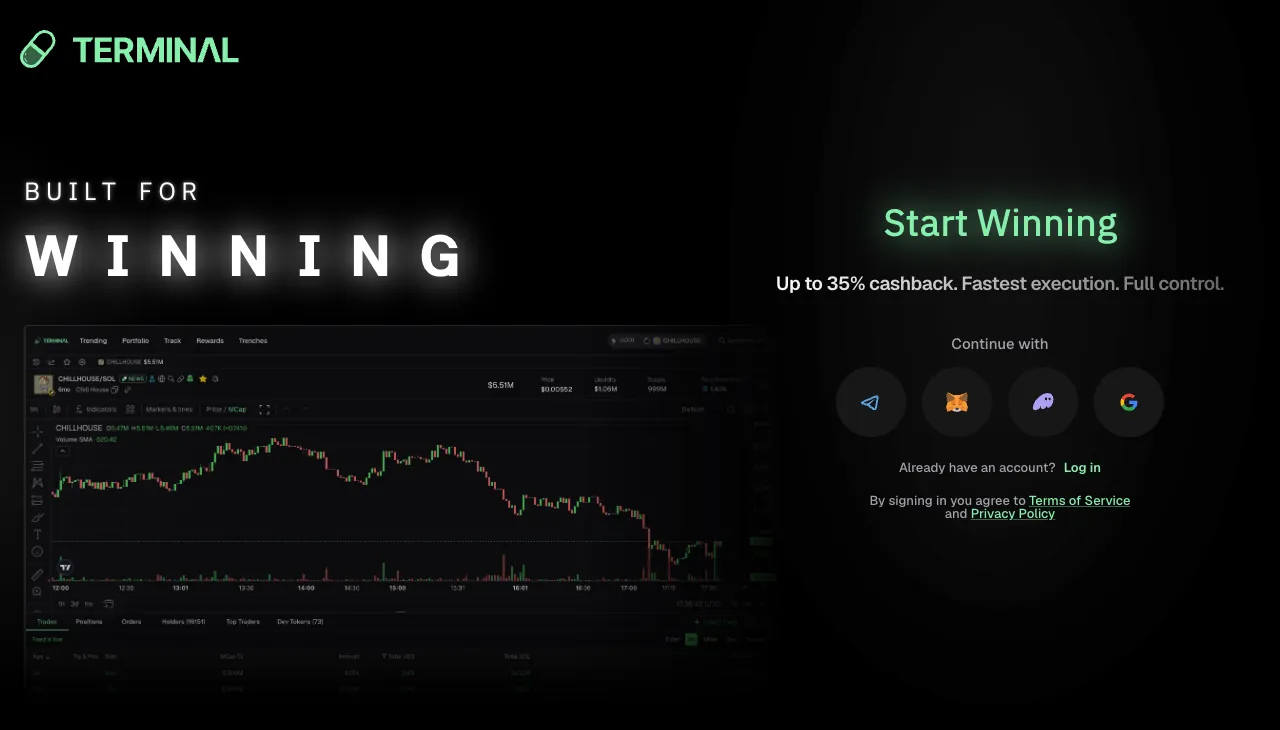
- Terminal logo
- “Up to 35% cashback” claim
- Sign-in options: Telegram, MetaMask, Phantom, Google
- Chart preview of the trading terminal
Public Terminal sign-in page (trade.padre.gg), captured 26 Oct 2026, logged out. Choose Telegram for step 2.
Use Terminal on your phone
Terminal is a progressive web app, not a store app, according to the Mobile App docs (opens in a new tab). On iOS, open it in your mobile browser, tap Share and choose “Add to Home Screen”. On Android, tap the three dots, choose “Add to Home Screen” and confirm the install. To sign in, the FAQ says to open “Sign in on mobile” in the Account Overview on desktop and scan the QR code with the phone.
Find your ref link, PnL card and order ID
The FAQ (opens in a new tab) gives these paths:
- Referral link: Account Overview (the person icon, upper right), then the Referrals section.
- PnL card: the Portfolio tab, then Open Positions or Closed Positions, then the trophy icon next to your profit.
- Order ID: the Order History tab on the token page, then Status, then the copy icon.
- Light colors: Settings (the gear icon), then the Colors tab.
If a trade times out, the FAQ names three causes: a balance too low for the trade and its cost, two trades sent at the same time, or slippage above your tolerance. To withdraw, the docs we could open give no step-by-step guide, so check the Wallets page in the app.
Bottom line
Padre Terminal, now called Terminal and owned by pump.fun, is a multi-chain terminal for Solana, Ethereum, Base and BNB Chain, with a non-custodial wallet and SOL cashback of 10% to 35% on fees. It pays no pump.fun app Platform Fee. We rate it 3.6/5.
The base fee is not published, so check it on your first trade. Export your keys before you deposit, because the team cannot recover a lost password. If you want to trade on your phone with a social feed instead, the pump.fun app is our Best overall pick.
Changelog
- 2026-10-26: added a screenshot of the public sign-in page to “How to use Terminal (Padre)”.
- 2026-10-24: retargeted to the current name Terminal (“padre terminal”, “pump fun terminal”). Checked the name on the official app and X account, added the pump.fun Platform Fee row from pump.fun’s Fees page, and added the sections “Terminal vs the pump.fun app” and “How to use Terminal (Padre)”.
- 2026-10-13: corrected the referral facts: our link carries the code memecoin-guru, we earn a commission, and Terminal’s docs give users who sign up through it 35% cashback. Corrected the BasedBot chain count to 18 networks and removed a wrong claim about which tools we tested: Locke traded on every reviewed tool.
- 2026-10-12: template upgrade: sources list, related pages, cashback highlight, glossary tips and bottom line. No facts changed.
- 2026-10-11: first review published.
Sources
- Terminal (official app): Terminal | Your Edge in Memecoin Trading (opens in a new tab) · checked Oct 24, 2026
- X: Terminal (@TradingTerminal) (opens in a new tab) · checked Oct 24, 2026
- pump.fun docs: Fees (opens in a new tab) · checked Oct 24, 2026
- Cointelegraph: Pump.fun acquires Padre to boost memecoin liquidity (opens in a new tab) · checked Oct 24, 2026
- Terminal docs: About Terminal (archived) (opens in a new tab) · checked Oct 11, 2026
- Terminal docs: Getting started (archived) (opens in a new tab) · checked Oct 24, 2026
- Terminal docs: FAQ (archived) (opens in a new tab) · checked Oct 24, 2026
- Terminal docs: Mobile App (archived) (opens in a new tab) · checked Oct 24, 2026
- Terminal docs: Security (archived) (opens in a new tab) · checked Oct 11, 2026
- Terminal docs: Referral Program (archived) (opens in a new tab) · checked Oct 11, 2026
- DL News: Pump.fun placates Padre token holders with airdrop promise (opens in a new tab) · checked Oct 11, 2026
- Cointelegraph: Pump.fun acquires Vyper trading infrastructure (opens in a new tab) · checked Oct 11, 2026
- Phemex News: Padre rebrands to Terminal after acquisition by Pump.fun (opens in a new tab) · checked Oct 11, 2026
Frequently asked questions
Keep reading
- Comparison · 8 minPadre vs Axiom (2026): terminal fees, chains and safety comparedPadre vs Axiom: Padre (now Terminal by Pump.fun) covers 4 chains incl. Base but hides its base fee; Axiom publishes 0.75–0.95% fees and 10% off with gurumeme.
- Referral code · 3 minPadre referral code (Terminal 2026): 35% cashbackPadre Terminal referral code memecoin-guru: Terminal’s docs give users who sign up with a referral link 35% SOL cashback on fees. How to apply it.
- Review · 11 minPump.fun app review (2026): fees, safety, scorePump.fun app review: our best overall memecoin app. Real fees (0.40% app fee with code lockein plus the 1.25% curve fee), safety, social features, 4.7/5.
- Best of · 15 minBest meme coin trading platforms (2026): 11 toolsWhere to trade meme coins in 2026: 11 meme coin trading platforms compared, from the pump.fun app and BasedBot to Fomo, on fees, custody and safety.
- Review · 6 minPhoton Sol review (2026): fees, safety and featuresPhoton Sol review: flat 1% fee on every trade, a private key shown only once, Memescope, limit and DCA orders. Solana only. No referral perk.
- Review · 7 minAxiom Trade (Axiom Pro) review 2026: fees, safetyAxiom Trade review, also searched as Axiom Pro: 0.95% to 0.75% fee tiers, a non-custodial wallet, settings and Pulse filters, and the 2026 insider data case.