BasedBot review (2026): fees, safety, cashback
We may earn a referral fee if you sign up through our links. It never changes our scores. How we make money
Tested by Locke
Updated Oct 16, 2026 · 13 min read
31 sources checkedRead our editorial policy

Our verdictBasedBot
Score4.6/5
Is it safe? Yes, with normal care. BasedBot is self-custody, you can export your private key, and we found no public report of a hack or loss of user funds (searched October 2026).
Referral code · Double cashback (10–50% of fees instead of 5–25%)
STARTVerified Nov 11, 2026
Best for: Multi-chain traders who want one Telegram bot and trading terminal for 18 chains, including Base, Solana, BNB Chain and Ethereum
Key takeaways
- BasedBot charges 1% per trade. Cashback returns 5–25% of fees by volume, or 10–50% with code START (our partner terms): new traders pay 0.9%, and 0.5% starts at $1,000,000 of total volume.
- BasedBot is self-custody: you can import your own wallet, or export the bot wallet’s private key in the web app.
- BasedBot covers 18 chains, including Base, Solana, BNB Chain, Ethereum, Arbitrum and Avalanche, as a Telegram bot (@based_eth_bot) and a web trading terminal.
- In the Telegram bot, MEV protection covers only Ethereum, Base and BSC, and the classic Sniper works only on EVM chains, per the BasedBot docs.
- We found no public report of a BasedBot hack, exploit or loss of user funds (searched October 2026). In Locke’s own trades, buys usually confirmed in under a second.
On this page
Key facts
| Type | Telegram bot and Web trading terminal |
|---|---|
| Chains | Base, Solana, BNB Chain, Ethereum, Arbitrum, Avalanche, Abstract, HyperEVM, Ink, Story, X Layer, Unichain, Plasma, Monad, MegaETH, Tempo, Robinhood Chain, Arc |
| Trading fee | 1% |
| Reader perk | Double cashback (10–50% of fees instead of 5–25%) |
| Referral code | START |
| Last tested | October 2026 |
Score breakdown
How we score- Fees
- 4.0
- Safety
- 4.5
- Execution
- 5.0
- Ease of use
- 4.5
- Features
- 5.0
What we like
- 18 chains in one Telegram bot and web trading terminal, including Base, Solana, BNB Chain, Ethereum, Arbitrum and Avalanche
- Buys usually confirmed in under a second in Locke’s own trades
- Full automation set: limit orders, TP/SL with a trailing stop, dev sell, DCA, copy trading, social copy trading and three sniper types
- Self-custody: import your own wallet, or export the key of the wallet the bot creates
- Cashback on every fee: 5–25% by volume tier, or 10–50% with code START
What we don’t like
- The 1% base fee is the market standard, and a new trader gets only 5% of it back (10% with code START)
- In the Telegram bot, MEV protection covers only Ethereum, Base and BSC, and the classic Sniper works only on EVM chains
- A web app account made with a browser wallet is separate from the Telegram account: settings, referral code and cashback tier do not carry over
- The docs say BasedBot gets regular security audits, but they publish no audit report
Our BasedBot review in short: BasedBot is a and web trading terminal for 18 chains, and it is safe with normal care. It charges 1% per trade. New traders start at 10% cashback with the BasedBot referral code START, so they pay 0.9%, and the cashback rises to 50% with volume (our partner terms). We rate it 4.6/5 after hands-on trading.
BasedBot in one paragraph
BasedBot is a multi-chain trading bot for memecoin traders who trade on more than one chain. You trade in the Telegram bot @based_eth_bot or in the web trading terminal at basedbot.app, with charts, token discovery and a portfolio view, per the web app docs (opens in a new tab). The bot detects the chain from the token address you paste, so you do not pick a network first, per the multi-chain page (opens in a new tab).
Its strength is breadth: 18 chains and a full set of automations in one trading terminal and bot. The number that matters most is the effective fee: 0.9% for a new trader with code START, and 0.5% at the top tier. If you trade on Base, Solana and BNB Chain, you do not need a different bot for each chain.
Fees
BasedBot charges 1% on each transaction. The fee comes out of the trade itself, with no hidden fees and no fee when you do not trade, per the platform fees page (opens in a new tab). A buy and a later sell are two transactions, so a full round trip costs 2% before cashback. Network gas comes on top, and you set it in the bot.
Cashback tiers and code START
Part of every fee comes back as cashback. Your tier depends on your total trading volume across all chains. It upgrades automatically, and no staking is necessary, per the rewards page (opens in a new tab).
| Tier | Total volume | Cashback | Effective fee | Cashback with START | Effective fee with START |
|---|---|---|---|---|---|
| X1 Novice | $0–$999 | 5% | 0.95% | 10% | 0.90% |
| X2 Advanced | $1,000–$9,999 | 10% | 0.90% | 20% | 0.80% |
| X3 Pro | $10,000–$99,999 | 15% | 0.85% | 30% | 0.70% |
| X4 Elite | $100,000–$999,999 | 20% | 0.80% | 40% | 0.60% |
| X5 Legend | $1,000,000+ | 25% | 0.75% | 50% | 0.50% |
Sources: the 1% fee from the platform fees page (opens in a new tab); tiers, volumes and cashback rates from the rewards page (opens in a new tab). The two START columns come from our partner terms with BasedBot, not from the docs.
Cashback is paid in the native coin of the chain you traded on, such as ETH on Base, BNB on BSC or SOL on Solana. You claim it with /cashback once you have $10 or more of cashback on a chain. The X4 Elite tier also unlocks the VIP bot, per the same rewards page.
Worked example: $100 and $1,000 trades
| Trade size | Fee (1%) | Net fee, X1, no code | Net fee, X1, with START | Net fee, X5, with START |
|---|---|---|---|---|
| $100 | $1.00 | $0.95 | $0.90 | $0.50 |
| $1,000 | $10.00 | $9.50 | $9.00 | $5.00 |
On a $100 buy you pay $1.00. As a new trader with code START, $0.10 of it comes back, so your net cost is $0.90. On a $1,000 trade, the same 10% returns $1.00 of a $10.00 fee.
The $10 claim minimum counts per chain, so small traders wait a while for the first claim. Our estimate from the published tiers, if you trade on one chain only: about $5,500 of volume with START, and about $10,300 without the code. To compare BasedBot with other bots at the same trade size, see our trading bot fees comparison or try the fee calculator.
1%
0.5–0.9%
Without the code, the effective fee is 0.75–0.95%, which is close to the market standard. With START, a trader who reaches the X3 Pro tier pays 0.7%, and the cashback keeps growing with volume.
Get double cashback on BasedBot (opens in a new tab)Code START applies automaticallySafety and incidents
BasedBot is safe with normal care. You hold the keys, the docs describe how the team contacts users, and we found no public incident. Here are the details:
- Custody: self-custody. The bot creates a wallet for you, or you import your own wallet with its , per the wallet guide (opens in a new tab).
- Key export: the Telegram bot docs have no export step. In the web app, the Portfolio page has an Export Key button that shows the wallet’s private key, per the Portfolio page (opens in a new tab). Log in to basedbot.app with Telegram to see the same wallet as in the bot.
- Key storage: the safety page (opens in a new tab) says the key is not stored in clear text. The database keeps the public key, the transaction history and a hashed private key.
- Audits: the same page says BasedBot “undergoes regular security audits”, but it names no auditor and links no report.
- Support and impersonators: the team never asks for your private key, never asks you to install anything and never sends the first DM, per the support page (opens in a new tab). Only the admins listed on that page are official.
- MEV protection: in the Telegram bot, it is a switch in /settings for Ethereum, Base and BSC only, per the settings page (opens in a new tab). It lowers the risk of a on those chains. The web app offers protection on EVM chains, per the web app trading page (opens in a new tab). Neither covers Solana.
- Incidents: we found no public report of a hack, exploit or loss of user funds at BasedBot (searched October 2026).
- Lookalike names: search results also show basedbot.net, which is not the trading bot. The trading bot lives at basedbot.app, and its official X account is @BasedBot.
A Telegram bot trades for you without a confirm step in your own wallet app. That is what makes it fast, and it is also why the bot wallet is a hot wallet: keep only trading money in it.
Hands-on: what we tested
Locke has traded on BasedBot for months, and the last test round for this review was in October 2026. We report only what Locke saw in his own trades. Every other claim in this section comes from the docs and has a link.
- Speed: in Locke’s own trades, BasedBot buys usually confirmed in under a second. This is an observation, not a measured average. Speed depends on the chain, your gas setting and network load. On layer-2 chains such as Base and Arbitrum, transactions are ordered first come, first served, so a higher custom gas gives no advantage there, per the transaction speed page linked above.
- The buy flow: paste a contract address or a pool address, and the token monitor opens. You choose the amount, the price impact limit (Impact), the slippage (Slip) and the gas, per the buying guide (opens in a new tab). Pro Mode skips the price impact check on EVM buys only.
- Token checks: the Audit button asks partner Serialized Labs for a contract analysis that can take up to 3 minutes. The token monitor also shows the buy, sell and transfer taxes of the token, per the Audit page (opens in a new tab). It does not replace your own checks: our rug pull guide lists the red flags.
- pump.fun coins: Pump.Fun and PumpSwap are on the supported networks and DEXes list (opens in a new tab). So you can buy and sell pump.fun coins from the bot or the terminal. The classic Sniper does not work there, because it is EVM only.
- Bot and terminal: when you log in to basedbot.app with Telegram, the web app uses the same wallet as the bot. If you log in with a browser wallet instead, you get a separate account, and your settings, referral code and cashback tier do not carry over, per the login page (opens in a new tab).
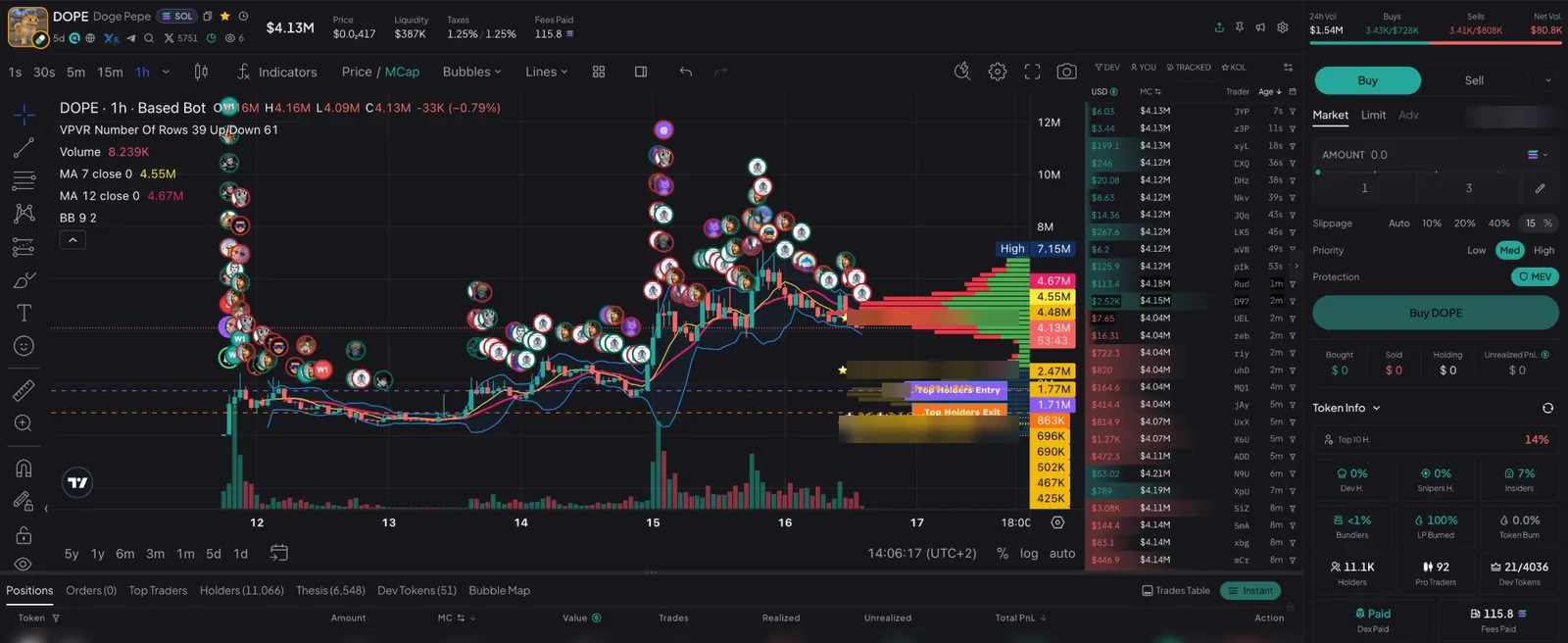
- Liquidity and buy and sell taxes
- Top holders’ entry and exit on the chart
- Trade filters: dev, your trades, tracked wallets, KOLs
- MEV protection toggle
- Token Info rug checks
Screenshot by Locke in the BasedBot web terminal, 16 Oct 2026. Wallet balances and positions are blurred.
The short version: buys were fast in Locke’s trades, and the token monitor puts the price impact, slippage and gas settings on the same screen as the buy buttons. The account split between the bot and a wallet-login web account is the one trap to know before you start.
Two screens help you scan before you open a token. Discover ranks live tokens and shows the tax and the Token Info safety numbers on every row. Pulse splits new launches into New Pairs and Migrated, with the same safety row under each token. For what each number means, read our rug checker guide.
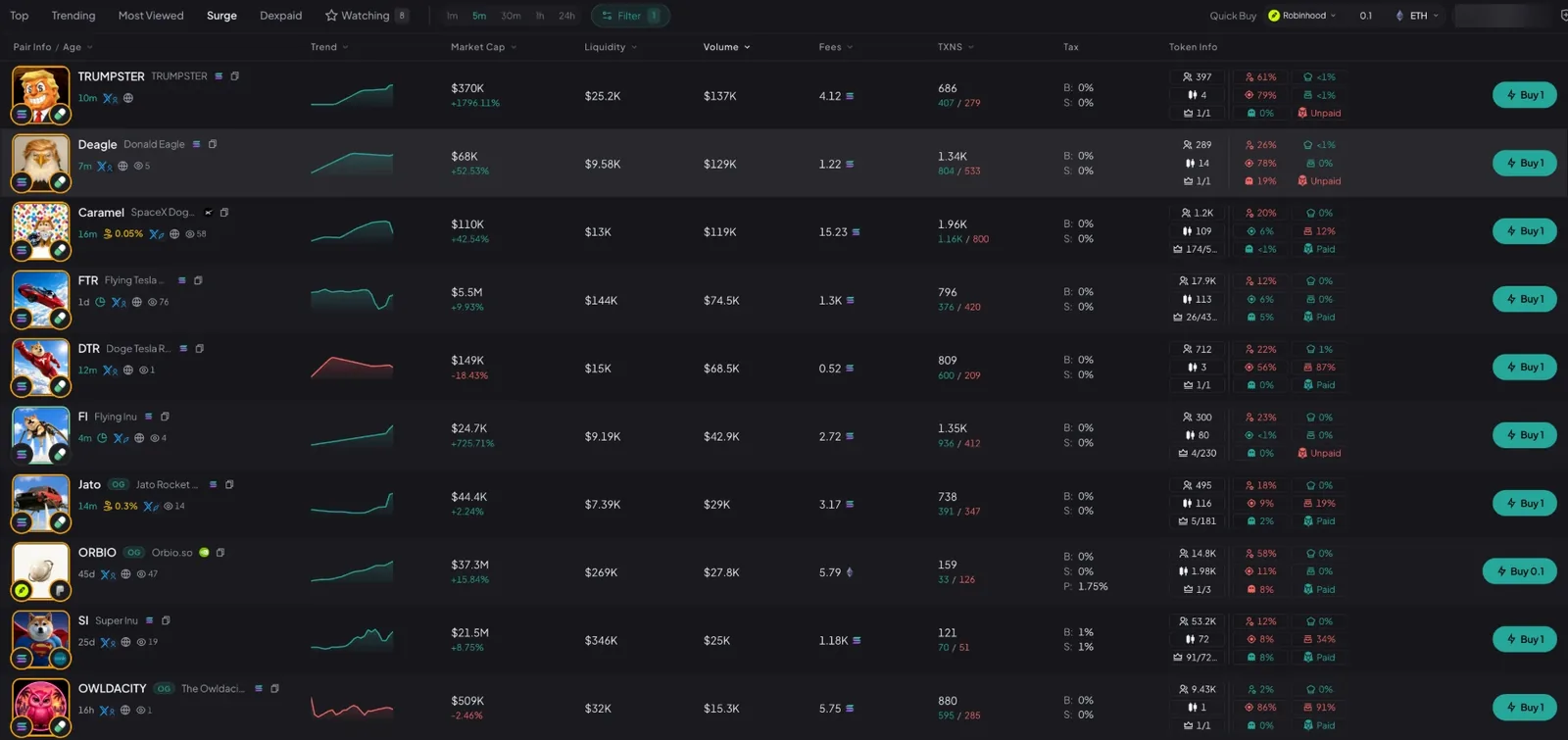
- List tabs: Top, Trending, Most Viewed, Surge, Dexpaid
- Buy and sell tax
- Token Info: holders, top 10, dev, snipers, insiders, bundlers
- Dex Paid or Unpaid
Screenshot by Locke in the BasedBot web terminal, 16 Oct 2026. Wallet balances and positions are blurred.
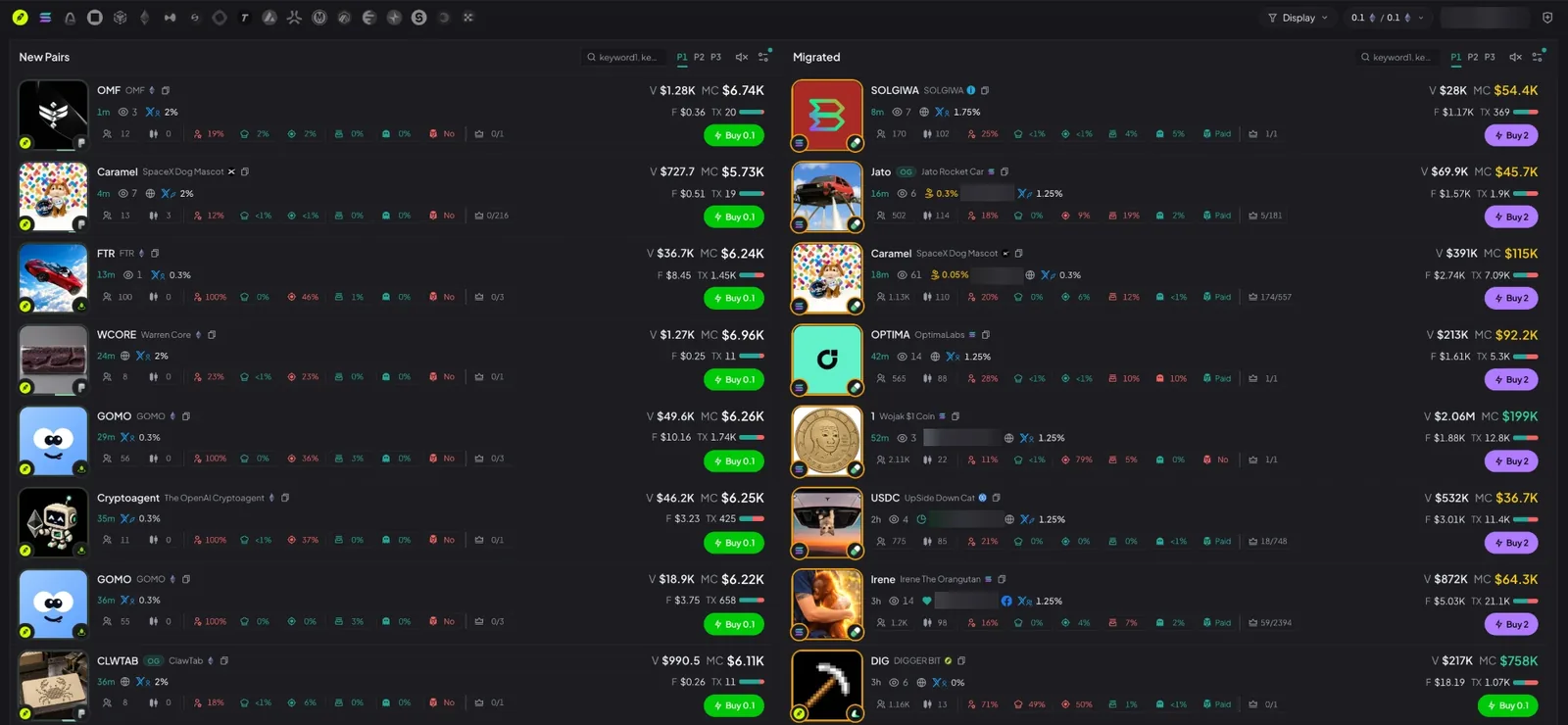
- New Pairs: tokens minutes after launch
- Migrated: tokens that moved to a DEX pool
- Safety row: holders, top 10, dev, snipers, insiders, bundlers
- Dex Paid: No
- One-click Quick Buy
Screenshot by Locke in the BasedBot web terminal, 16 Oct 2026. Wallet balances and positions are blurred.
Features
BasedBot puts every common automation in one bot. The table lists what the docs describe. “Partly” marks a limit that you should know before you trade.
| Feature | BasedBot | Docs |
|---|---|---|
| Chains | Yes: 18, the 16 in the docs list plus Robinhood Chain and Arc | Networks list (opens in a new tab) |
| Bot and web terminal | Yes: @based_eth_bot and the web trading terminal at basedbot.app | Web app (opens in a new tab) |
| Multi-wallet | Yes: no wallet limit, and the All button acts on all wallets at the same time | Multi-wallet (opens in a new tab) |
| Key export | Partly: Export Key in the web app; no export step in the bot docs | Portfolio (opens in a new tab) |
| MEV protection | Partly: Ethereum, Base and BSC in the bot, EVM chains in the web app, not Solana | Settings (opens in a new tab) |
| Classic Sniper | Partly: EVM chains only; buys when a pool is created | Sniper (opens in a new tab) |
| Custom Sniper | Yes: filters by name or symbol, DEX or launchpad, chain and creator | Custom Sniper (opens in a new tab) |
| Migration Sniper | Yes: buys or sells when a token moves to a new pool; the docs name no launchpad | Migration Sniper (opens in a new tab) |
| Limit orders | Yes: triggered by market cap, not by price | Limit orders (opens in a new tab) |
| Take profit, stop loss | Yes: with a trailing stop loss option | TP/SL (opens in a new tab) |
| Dev sell | Yes: sells 100% of your tokens when the developer sells | Dev sell (opens in a new tab) |
| DCA | Partly: buys only; sells are “coming soon” | DCA (opens in a new tab) |
| Copy trading | Yes: Base, BNB Chain, Ethereum, Abstract, Solana, Avalanche, HyperEVM and Tempo | Copy trading (opens in a new tab) |
| Social copy trading | Yes: buys tokens that accounts you follow post on X, Zora or Warpcast | Social copytrading (opens in a new tab) |
| Wallet tracker | Yes: alerts for buys, sells and token creations | Wallet tracker (opens in a new tab) |
| Bridge | Yes: native coins only | Bridge (opens in a new tab) |
The two limits that matter most are on Solana: the bot has no MEV protection there and no classic Sniper. On Solana you still get limit orders and copy trading, per the docs.
Limit orders use a market-cap target, not a price. Set the target as the market cap at which you want to buy or sell, and the order runs once and then disappears. DCA buys on a schedule or in BUMP mode, but it cannot sell yet, so plan your exits with take profit and stop loss. Our BasedBot take profit and stop loss guide shows each step.
New to ? Read how to snipe memecoins before you set up a sniper, and see the best sniper bots for ranked options. For copy trading, our best copy trading bots list compares the tools. For a DCA plan, read the crypto DCA guide.
Where other tools are better
BasedBot wins on breadth, but it is not the best pick for every trader. Here is where other tools do better:
- A cheaper start on Solana: Trojan’s Telegram bot gives 20% cashback to all users, per the Trojan bot FAQ (opens in a new tab), so a new trader pays about 0.8% from the first trade. On BasedBot with START, a new trader pays 0.9%. BasedBot matches Trojan at the X2 tier ($1,000 of volume) and is cheaper from X3. Trojan is Solana only. See BasedBot vs Trojan and our Trojan review.
- Perps next to spot trades: Axiom offers perps through Hyperliquid in the same web terminal, per its Hyperliquid trading guide (opens in a new tab). BasedBot’s docs list no perps trading. Axiom’s net fee goes from 0.95% to 0.75% by volume tier, per the Axiom fees page (opens in a new tab). See the Axiom review.
- A phone app with card payments: the Fomo app lets you buy memecoins with Apple Pay. On Solana, Fomo pays the gas and the fee depends on trade size: 2% from 5 to 47.50 USDC, a flat 0.95 USDC up to 190 USDC, then 0.50%. On EVM chains it is 0.50% plus network fees, per Fomo’s fee page (opens in a new tab). If you never want to manage a seed phrase, see the Fomo app review.
For a ranked list that uses the same scores, read the best Telegram trading bots.
How to sign up with double cashback
Sign up through our link before you first start the bot. Code START then doubles your cashback on every chain.
- 1
Open BasedBot with our link
Use the Telegram button below: it opens @based_eth_bot with code START. The code applies when you first start the bot, so use the link before you type /start. For the web terminal, open basedbot.app/r/START instead. - 2
Create or import a wallet
In /wallet, let the bot create a wallet, or import one that you control with its private key. Then export the key from the Portfolio page of the web app and store it offline. - 3
Fund the wallet and make a small first trade
Send a small amount of the chain’s native coin, such as ETH, SOL or BNB. Check the fee on your first trade, and claim cashback with /cashback once you have $10 or more on a chain.
Our full BasedBot setup guide covers every step: the deposit, the first buy, selling, limit orders, DCA and copy trading.
Start BasedBot in Telegram (opens in a new tab)Opens @based_eth_bot with code STARTBottom line
BasedBot is a self-custody Telegram bot and web trading terminal for 18 chains. It is safe with normal care, and we rate it 4.6/5 after hands-on trading. With code START, a new trader pays 0.9% per trade, and the fee falls to 0.5% from $1,000,000 of total volume.
Skip it if you trade only on Solana and want MEV protection or the classic Sniper there, if you want perps in the same terminal, or if you want a phone app that hides wallets and gas. Locke works with BasedBot; it is scored with the same methodology.
Changelog
- 2026-10-16: the sign-up button now opens the BasedBot Telegram bot with code START.
- 2026-10-16: added screenshots from Locke’s own BasedBot web terminal: the token page with Token Info, Discover and Pulse.
- 2026-10-16: updated the Fomo fee and gas facts in the alternatives from Fomo’s help center.
- 2026-10-14: rebuilt the review to our review template: a cashback tier table with code START columns, worked fee examples at $100 and $1,000, a dated incident search, a Features table, alternatives with numbers, and inline links to the BasedBot docs. Removed the launch year and the token FAQ, because no public source confirms them. The how-to steps now live in the BasedBot setup guide.
- 2026-10-13: corrected the chain count to 18; limited MEV protection to Ethereum, Base and BSC and the classic Sniper to EVM chains; described limit orders as market-cap targets; named the volume tier behind the 0.5% fee; marked the START double cashback as our partner terms; added the web trading terminal next to the Telegram bot; described the buy speed as Locke’s own observation, not a measured average.
- 2026-10-12: sources, related pages and a bottom line added; no facts changed.
- 2026-10-11: first review published.
Sources
- BasedBot docs: BasedBot platform fees (opens in a new tab) · checked Oct 14, 2026
- BasedBot docs: BasedBot rewards (opens in a new tab) · checked Oct 14, 2026
- BasedBot docs: BasedBot supported networks and DEXes (opens in a new tab) · checked Oct 14, 2026
- BasedBot docs: BasedBot multi-chain (opens in a new tab) · checked Oct 14, 2026
- BasedBot docs: BasedBot web app (opens in a new tab) · checked Oct 14, 2026
- BasedBot docs: BasedBot safety and security (opens in a new tab) · checked Oct 14, 2026
- BasedBot docs: BasedBot technical support and community (opens in a new tab) · checked Oct 14, 2026
- BasedBot docs: BasedBot managing wallets (opens in a new tab) · checked Oct 14, 2026
- BasedBot docs: BasedBot web app portfolio (opens in a new tab) · checked Oct 14, 2026
- BasedBot docs: BasedBot web app login and authentication (opens in a new tab) · checked Oct 14, 2026
- BasedBot docs: BasedBot settings (MEV protection) (opens in a new tab) · checked Oct 14, 2026
- BasedBot docs: BasedBot web app trading (opens in a new tab) · checked Oct 14, 2026
- BasedBot docs: BasedBot transaction speed (opens in a new tab) · checked Oct 14, 2026
- BasedBot docs: BasedBot buying tokens (opens in a new tab) · checked Oct 14, 2026
- BasedBot docs: BasedBot audit (opens in a new tab) · checked Oct 14, 2026
- BasedBot docs: BasedBot multi-wallet (opens in a new tab) · checked Oct 14, 2026
- BasedBot docs: BasedBot Sniper (opens in a new tab) · checked Oct 14, 2026
- BasedBot docs: BasedBot Custom Sniper (opens in a new tab) · checked Oct 14, 2026
- BasedBot docs: BasedBot Migration Sniper (opens in a new tab) · checked Oct 14, 2026
- BasedBot docs: BasedBot limit orders (opens in a new tab) · checked Oct 14, 2026
- BasedBot docs: BasedBot take profit and stop loss (opens in a new tab) · checked Oct 14, 2026
- BasedBot docs: BasedBot dev sell (opens in a new tab) · checked Oct 14, 2026
- BasedBot docs: BasedBot DCA (opens in a new tab) · checked Oct 14, 2026
- BasedBot docs: BasedBot copy trading (opens in a new tab) · checked Oct 14, 2026
- BasedBot docs: BasedBot social copytrading (opens in a new tab) · checked Oct 14, 2026
- BasedBot docs: BasedBot wallet tracker (opens in a new tab) · checked Oct 14, 2026
- BasedBot docs: BasedBot bridge (opens in a new tab) · checked Oct 14, 2026
- Trojan docs: Trojan on Solana bot FAQ (opens in a new tab) · checked Oct 14, 2026
- Axiom docs: Trading on Hyperliquid (opens in a new tab) · checked Oct 14, 2026
- Axiom docs: Axiom fees (opens in a new tab) · checked Oct 14, 2026
- Fomo help center: Trading fees on fomo (opens in a new tab) · checked Oct 16, 2026
Frequently asked questions
Keep reading
- Referral code · 3 minBasedBot referral code (Nov 2026): double cashbackBasedBot referral code START: double cashback on trading fees (10–50% instead of 5–25%). Verified October 2026. How to apply it in one click.
- Guide · 8 minHow to use BasedBot (2026): setup and first tradeHow to use BasedBot step by step: open @based_eth_bot in Telegram, create a wallet, deposit, buy and sell, then set limit orders, DCA and copy trading.
- Guide · 3 minHow to set a BasedBot take profit and stop lossSet TP/SL in BasedBot: open the token monitor, turn TP or SL on, set the trigger % and the % to sell. Plus the trailing stop loss and /orders.
- Comparison · 8 minBasedBot vs Trojan (2026): fees, chains and sniping comparedBasedBot vs Trojan: both charge 1%. BasedBot: 18 chains, 10–50% cashback with code START. Trojan: Solana only, 20% bot cashback. Safety and which to pick.
- Best of · 10 minBest Telegram trading bots 2026: 6 bots comparedThe best Telegram trading bot for Solana and multi-chain memecoins: BasedBot, Trojan, BONKbot, Maestro, Banana Gun and GMGN by fees, key export and chains.
- Review · 6 minBONKbot review (2026): fees, safety and featuresBONKbot (Bonk bot) review: 1% fee per swap, Signer key security with 2FA, Solana only, the March 2024 key-export drains, and the Telemetry terminal.
- Review · 6 minMaestro bot review (2026): fees, safety and sniperMaestro bot review: 1% fee with 15–30% cashback, $200/month Premium, 12 chains incl. Solana, Ethereum, Base, Tron and TON, and the 2023 exploit.
- Review · 5 minTrojan bot review (2026): fees, cashback, safetyTrojan bot review: 1% fee with SOL cashback, non-custodial wallets with key export, Solana-only web terminal and Telegram bot. Docs checked Oct 2026.